Featured Post Today
print this page
Latest Post
Showing posts with label Apps. Show all posts

New Technology Update : A Malicious WhatsApp Video Feature Invite Is Spreading Across The Messaging App

WhatsApp recently announced the launch of its video calling feature which has started to roll out for Android, iOS and Windows Phone users. While a number of messaging apps offer this feature, WhatsApp has been a little late, it does however have the biggest user base across the globe.

While the news is welcoming, many users are receiving as well as sharing an unverified link on WhatsApp which is said to be an invite to activate the video calling feature. An invite system was introduced last year on Whatsapp when the voice calling feature was rolled out. It seems that certain scammers are trying to take advantage of this as they have spread a similar looking fake link for the new video calling feature.

WhatsApp has not officially released any links this time to enable any feature, so in case you get any such links, do not visit any of the links. Visiting these links could be harmful and could expose your personal data.

According to a report, the link takes you to what seems to look like an authentic page where it asks you to send the malicious link to other people on your list. It also mentions the existence of group WhatsApp video calling, a feature that is still not officially available on the platform.

If you do happen to get an invite to activate the video calling feature on WhatsApp, do ignore it. To get the feature you just need to update the app to the latest version. In case you don’t see an update, wait for a couple of days as it is rolling out in phases.

News Google Tech Update : Google Launches Allo In The Play Store; Here Is How To Get Started


Image Credit: Google Play Store

Google has finally launched the much anticipated messaging app by the company, Google Allo. It was previously reported that that messaging app would launch today. Allo is the part of communication platform made in conjunction with Google Duo. Duo was released some time back by the company, and it focused on video whereas Google Allo is focused on text communication along with sending media such as photos, audio messages, stickers and locations.
Google Allo main screen

You can start using Allo by going to Google Play Store and installing it on your Android device. The interface is pretty bare bones but quite functional for a messaging app. When you launch the app for the first time, the app asks you to verify your mobile number similar to how things work on Google Duo. The SMS verification servers seem to be in place for Allo verification. After the verification, the app asks you to set a profile picture and name.
Google Assistant

The app interface is reminiscent to how Google Hangout looks like (but without all the features in Hangouts). Nothing has changed since the leaked screenshots for Google Allo in alpha stage. On launching, you get the first (and only) surprise that Google Allo holds, that is “Google Assistant”, the bot by Google while will replace Google Now in the upcoming update, Android Nougat 7.1. It is a vital part of the experience provided by Google Assistant and a step away from how popular messaging apps work. Google Assistant is what Cortana from Microsoft and Siri from Apple are, but inside a chat window currently. The bot is labelled as ‘Preview Edition’ but in the limited tests that we ran, Assistant left us impressed coming from Google Now as the previous native offering in Android.
Sticker Store, Template replies

While diving into the chat experience, Allo does the basics of sending text, photos shot from the front or back camera, pictures from gallery, stickers and location. You can send 20 photos at a time in Allo from the ten photos limited on WhatsApp. Another small change is that in the notifications area, the app shows smart response as a quick reply to contacts who message you. Machine learning is working full time to suggest bubble shape cards in the chat as appropriate message responses to the conversations. Finally, you can search inside your conversations, as against the searchless realm that Google Hangouts are.
 Incognito Chats

There is nothing new when you dive in the Profile section or the General settings menu, and there are just small things like controlling the notifications, sounds, vibration and to download the media when you receive it. There is no status updates or message that you can set for people in your contact list to read. 

Google Allo turns into Snapchat
 
The reason we mentioned that the chatting experience is different from how it is in the conventional messaging is apps is that you can summon Google Assistant in your private conversations to ask questions, play games or device on dinner options or the movie options. This brings a whole different side to the concept of user privacy and the only remedy seen is the use of incognito chat with other users.
Group conversations

Incognito mode features auto-destruct messages just like Snapchat which expire after a fixed amount of time depending on the settings. Infact, you can turn Google Allo into an almost functioning Snapchat clone except Stories or ability to check who saw your stories.
The summon behaviour is consistent across individual as well as group chats where you can call in Google Assistant to ask questions and suggestions on places nearby. However, you can’t tag Google Assistant in incognito chats. Apart from this nothing much stands out in the latest messaging app by Google, Google Allo.

News Update On Navigation : Navigation App Waze Gets A Huge Redesign – Now Less Cluttered, But Still Needs Improvement

The Google-owned navigation app Waze has a number of standout features – its ability to alert you to traffic conditions and speed traps, and re-route you around traffic jams, for example – but its user interface was not one of its better qualities. Today, the company is attempting to change that with the rollout of an entirely made-over version of its iOS application that introduces a cleaner, less-cluttered interface designed to simplify accessing Waze’s key features, and speed up the time it takes to report traffic problems.
While traditional mapping applications, like those from Apple and Google, are still the most popular among smartphone users, Waze has a strong following among drivers and commuters thanks to its ability to alert you to traffic conditions. Beyond just telling you that traffic is slow, Waze can tell you why – maybe there’s an accident ahead, or a stalled vehicle. Users also like it for its ability to alert you when cops have been spotted nearby – something that makes Waze something of an alternative to radar detectors.

Plus, its ability to route you around bad traffic in real-time as conditions change is especially helpful, as is its ability to let you add a stop while planning your route.

Today, Waze has over 50 million active users who log into Waze monthly, the company says.

But despite having a collection of useful features, the app’s interface itself has needed work for some time. Instead of a modern, clean aesthetic, Waze previously relied on a couple of menus – one with a cartoon-ish car icon to access the main menu, and the other map pin-shaped icon with an exclamation point in the middle for reporting incidents. And the map itself was messy and cluttered, making it hard to read.
With the new version of the app, Waze offers a de-cluttered map, and it makes the alerting feature more prominent – it’s an orange icon with a rounder pin. Meanwhile, the car icon with access to the menu and other settings has been relocated to the bottom-left. When you’re in a hurry – as drivers are behind the wheel (they’re not supposed to be using the app in-route, but of course they do) – this makes it easier and faster to participate in the Waze community because it’s more obvious which button to press to add a report.

In addition, the updated app now features quick access to a contacts section (as indicated by the mail envelope icon), where you can share directions with your contacts, send your location, and your ETA with a tap.


A bottom menu also slides up when tapped to offer you easy access to things like alternate routes, the “add a stop” feature, as well as a shortcut to sending your ETA to a friend or family member.

Nearly everything you do in Waze now takes fewer taps, which is another one of the bigger improvements over the prior version. And the menus themselves have been redesigned, too, to be quicker to use. For instance, the reporting menu now uses big, brightly-colored, round buttons for things like reporting accidents, road hazards, police, and more.

Waze 4.0 also lets you sync your Calendar to the app so you can receive alerts reminding you when to leave, based on traffic conditions. The company says it has made other improvements, too, like better battery life.
Waze Still Needs Work

Unfortunately, the new app still relies on its bubbly, cartoon-ish icons. This is a personal preference, of course, but I think it’s time to move away from this sort of juvenile look. It’s frankly just sort of silly to see cars with bows on their head, or pacifiers in their mouth, or wearing little crowns in an app aimed at adults old enough to drive a car.

The new design is certainly an improvement, but Waze still hasn’t delivered a truly sleek look-and-feel. Even now, there’s too much to look at on the screen.

Because Waze already shows things other mapping apps don’t have – like the other cars and graphics like ads for business as little road signs  – it needs to be even more careful about what other buttons should appear. Now it features an orange reporting button, a MPH indicator, the time, ETA, and distance, and a big button for finding your current geo-location. This latter item is positioned to the left and sort of up near the middle of the screen, though Apple and Google Maps put this feature closer to the bottom of the screen.

Plus, when you tap on the screen, tons of other buttons appear, including the compass, sound toggle, zooming feature, and when at a particular zoom level, your location finder. Combined with all the car icons and icons of signs, alert icons, and more, Waze still struggles with offering a truly clean-looking map.

Off the top of my head, I can still spot a number of things I’d change. For starters, Waze needs to ditch the MPH button entirely – drivers look at this on their car’s dashboard anyway. The geo-location feature needs to be much smaller and closer to the bottom of the screen.The bottom of the screen doesn’t need a greeting (e.g. “Good Afternoon”) when no route is in progress. And there’s no need to flag how many new messages you have and add a red dot to indicate you have unread mail – this could all be handled with a push notification and red icon badge on your iOS homescreen.

That said, Waze certainly looks better than before, if not great.
The updated app, Waze 4.0, is live on the iTunes Store now with an Android release soon to follow.

News Update & Deal Of The Day : 8 Paid iPhone Apps On Sale For Free Today

Happy Monday, dear readers. You didn’t think we would let you go through an entire day without a list of paid iPhone and iPad apps on sale for free, did you? Better late than never, and today’s list is worth waiting for.
These are paid iPhone and iPad apps that have been made available for free for a limited time by their developers. There is no way to tell how long they will be free. These sales could end an hour from now or a week from now — obviously, the only thing we can guarantee is that they were free at the time this post was written. If you click on a link and see a price listed next to an app instead of the word “get,” it is no longer free. The sale has ended. If you download the app, you will be charged.

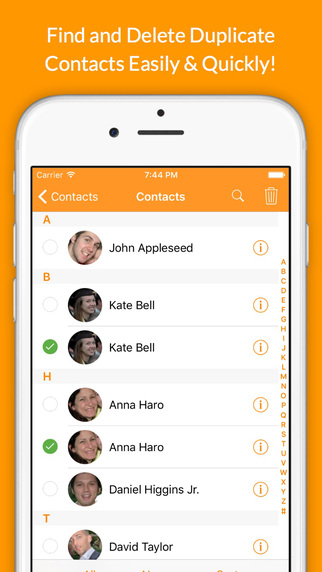
Delete Duplicates + CleanUp

screen322x572-1
Normally $0.99.
Thanks to this app, you can delete all the duplicate contacts from your address book, you can delete a lot of contacts all at once and you can backup your contacts right from your iPhone or iPad.
Users wrote: “It took me 5 mins what would have taken me more than 2 hours to complete”
“This is the best if you need to delete a lot of numbers all at once”
“So glad I found this!!!”
Features:
-Delete all the duplicate contacts from your address book.
-Quickly delete multiple contacts at once.
-Delete contacts according filters (without phone, notes, etc..).
-Delete contacts from a group.
-Delete groups of contacts.
-Backup your contacts.

This app is compatible with iPhone and iPad.

Guardian Sword

screen322x572-2
Normally $2.99.
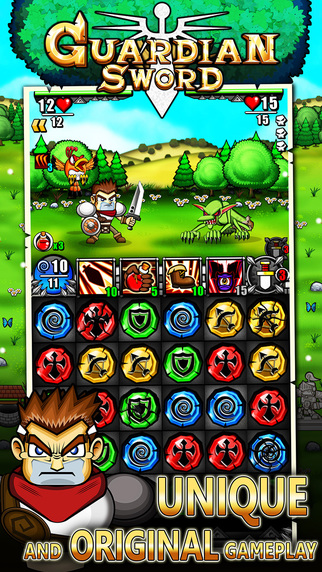
From the creators of Tiny Defense comes Guardian Sword – a strategy puzzle RPG with unique gameplay and classic RPG charm.
Set off on an epic journey with Guts – a fearless swordsman who seeks an ultimate legendary weapon that gives the owner infinite power. But his road is not a bed of roses when it is the Guardian Sword that everyone can kill for…
The cause of “The Last War” has started!!
Guardian Sword is a strategy puzzle RPG, full of classic RPG charm that you rarely see in the genre these days.
Guardian Sword Highlight is the unique gameplay that allows the players to customize the puzzles by themselves. You can choose from 40 Tiles with different abilities which means you can devise your own strategy in various ways and limitless.
If you are looking for a game that is all new and if you would like a simple yet very strategizing gameplay, you are looking for “Guardian Sword”.
GAME FEATURES
• Choose a set of Puzzles from 40 Tiles with unique abilities
• Enhance with more than 20 Special Skills and Ultimate Attacks
• Fight alongside your Teammates together with their specific skills
• Meet over 120 different enemies and defeat strong Bosses!
• Level up your character and upgrade as you wish
• Stores to buy Weapons, Armors and Items
• Large world map for you to travel over 90 maps
• Impressive story, from an ordinary man to a hero… How the story goes? Only the ones who play to the end of the legend know!!
OTHER FEATURES

• Game Center Leaderboard and Achievements
• Universal app: play on your iPhone, iPad or iPod touch
• iCloud support for you to share your progress across devices
• Official walkthrough and strategy guide
• Recommended Hardware – iPhone 4S, iPod touch 5th gen, iPad 2/mini or better

GetSpace

screen322x572
Normally $2.99.
Smart and easy way to save tons of disk space on your iPhone!
Keep your camera roll clean and don’t waste your time manually deleting unnecessary photos.
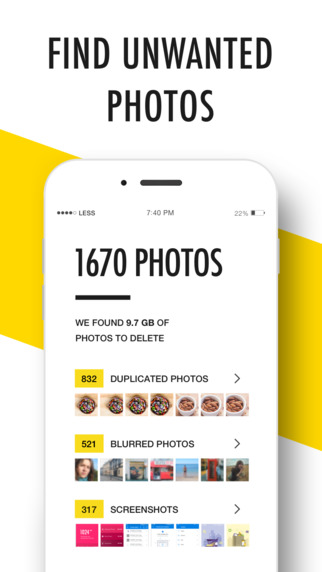
GetSpace helps you to free up your photo gallery from all unwanted photos AUTOMATICALLY.
Simple, elegant and intuitive interface designed with your convenience in mind.
Machine learning algorithms, face detection and neural networks are under the hood.

[Features]:
– Auto-finding of Duplicated photos. No more hundreds of copycats in your gallery! GetSpace keeps the best ones and deletes the worst. Machine learning algorithms and Face detection are under the hood. Also Manual control provided for your convenience.
– Auto-detection of Blurred and Unfocused photos. Lots of illegible photos? We had also. Delete them all in a few seconds!
– Love sharing Screenshots? Choose the unwanted old ones and free your disk space easily!

Plus new features in next updates:
Optimizing photos and videos of your gallery. Reduce the size of your photos up to 6x times with identical looking.
Keep your important photos safe from deletion.
Delete Instagram photos.

Useful tip: the system puts all your deleted photos in the “Recently Deleted” folder of your default Photos app. To delete them finally and free your disk space or restore your photos, please, follow this steps:
– Open default Photos app.
– Go to Albums / Recently Deleted.
– Press Select and Delete All (or Restore All).

Web Explorer

screen568x568
Normally $0.99.
Full featured web browser, Ads Remover, Power Downloader, Complete Webpage Saver, FTP client, ….!!!
“Amazing web browsing experience… “
Web Explorer feature highlights:
>>Super fast full screen, tabbed web browser.
— On all devices and all orientations.

>>Integrated text and web page translation.
— Launch translator on a new tab.

>>Download web files and links.
— Press and hold on pictures or file links to start download.

>>Save full content web pages for offline use.
— Complete web page saver.

>>Central media player
— Standard feature. Play all music and videos from one place. All media in App folders including iTunes File Sharing folder, iPod library and Camera Roll videos.

>>FTP browser. FTP upload and download.
— Browse FTP sites, upload and download files.

>>User Agent (Spoofing). By choosing Mac, Windows, iPhone, iPad or other options, you can request different content for the same site.
>>Integrated text search.
— Search web with selected text in the web page.

>>File reader supports all major file formats.
— View or play saved content from web or PC/MAC.

>>Configurable Start Page.
— Edit quick links on Start Page for easy access.

>>Power download
— Download multiple files/media/pictures from web page links or FTP directory. (In-App purchase).

>>ADBLOCKER for automatic ads removal.
— Block ads from nearly 3000 ads servers.(In-App purchase)

>> Document interaction.
— Open files from other apps with Web Explorer.

>>iTunes File Sharing with your PC/Mac.
— Exchange content between this app and PC/MAC.

>>Optimized for iPhone/iPad/iPod Touch.
— Customize interface best for different devices.

Support file types:
.xls,.key.zip,.numbers.zip,.pages.zip,
.pdf, .ppt , .doc, .rtf,.rtfd.zip, .key,.numbers,.pages,
.txt .m .h .c .js .css .cpp .php …

Ticket to Ride Pocket

screen640x640
Normally $1.99.
*** Winner of Pocket Gamer 2012 Reader’s Choice Award – iPhone/iPod Touch ***
*** Ticket to Ride just won the 2012 Pocket Gamer Awards for Best Strategy/Simulation Game!! ***

*** Apple Game of the Week (iPhone) in Europe, November 17-23, 2011- #1 in Board Games, #1 in Strategy Games in 32 countries, including UK, France, Germany, Canada and USA!
PUT THE BEST-SELLING TICKET TO RIDE BOARD GAME IN YOUR POCKET!
A UNIQUELY FUN TRAIN ADVENTURE THAT TAKES A MINUTE TO LEARN BUT A LIFETIME TO MASTER!

OVER 2 MILLION PLAYERS HAVE ALREADY HOPPED ON BOARD!
Kotaku Gaming, App of the Day: “If you’ve never played the board game Ticket to Ride, boy, are you missing out… I’ve only played the iPhone version, but can’t put it down.”
Cult of Mac: “Like its bigger iPad-dwelling brother, the iPhone version is very well designed and produced… It’s set to take the mobile gaming world by storm again.”
Epinions.com: “It’s the most enjoyable game I’ve played all year. Call it heresy but Angry Birds just didn’t do it for me like placing colored trains across a map of the United States. “
Gamezebo: “An excellent portable adaptation of one of the best board games of the last 10 years (and) a great point of entry for gamers not familiar with the series.”
TapCentral: “A phenomenal game at a phenomenal price.”
** What is it?
A digital adaptation of the best-selling Ticket to Ride board game, designed from the ground up specifically for the iPhone and iPod Touch.

** What’s in it?
• A SOLO and PASS-and-PLAY version of the US map that made the original Ticket to Ride board game so compelling and popular (2 million copies and counting…).
• LOCAL play support over a same Wi-Fi or Bluetooth network, making it perfect for a game-on-the-go between friends.
• A new MULTI mode for playing asynchronously with one or more online friends, using Game Center under iOS 5. You can even play multiple games simultaneously.
• 30 uniquely fun Game Achievements you can win while playing SOLO!
• Distinct leader boards showing your highest scores in 2-3 and 4-5 player modes and on Game Center.
• Four distinct AI personalities to compete against.
• A new under 2 minute Tutorial video, custom-shot for the iPhone & iPod Touch.

Hatchi

screen568x568-1
Normally $0.99.
Hatchi is a retro-looking iPhone and watch app sure to get the nostalgia burning for all those who cared for a virtual pet back in the 1990s when they were at the height of their popularity. Just as with the keychain-sized pets of the 90s, iPhone, iPod and iPad users now will feed, clean, play with and generally look after their pets to ensure they grow up to be healthy, happy little Hatchis. He needs YOU!
*** Featured on Touch Arcade Best iPhone and iPad Games***
Your Hatchi monster will go through several stages of growth, and will look different depending on the type of care the player provides. There are also NEW EGGS you can get which give you all new types of Hatchi!
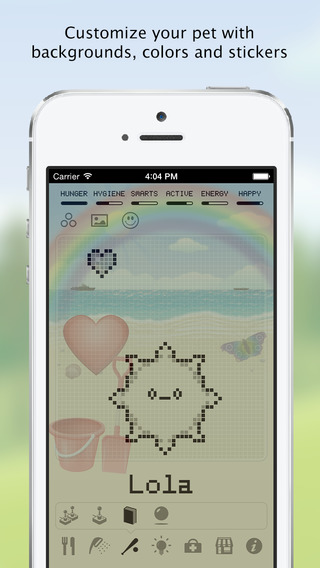
Customise your Hatchi!! You can:
* Choose different backgrounds like the park or the beach!
* Use stickers to customise the background to give Hatchi a better environment!
* Change the color of your Hatchi’s pixels!

How will YOU customise your Hatchi?
Play mini games!! including:
* The Hatchi Matchi memory game
* Hatchi Squares – play against your Hatchi!
* Roshambo – What Hatchi will you pick?
* Hatchi Catchi – move your Hatchi to catch falling food
* Its raining meds – avoid the meds!
* Whack a Hatchi – whack as many as you can!

and now our ALL NEW MULTIPLAYER BATTLING GAME!!
Play Hatchi Battle with your Game Center friends and see who wins!

Feed, clean, play and watch it evolve over several days.
“Say goodbye to your productivity. Say hello to your new friend.” Gizmodo.com
“It’s hilarious, but I really, really, really don’t want Big Poppa Pump (his Hatchi monster) to bite the dust. I’ve somehow bonded with the thing” TouchArcade.com

Time Off

screen568x568-1
Normally $1.99.
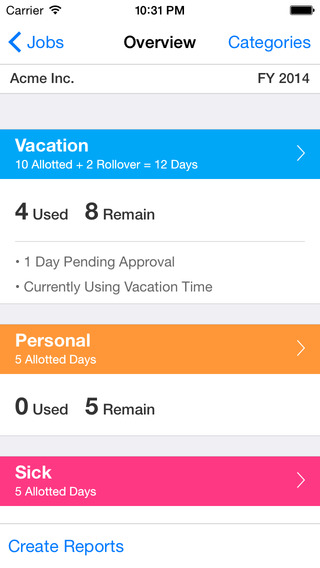
Finally, an app that makes it easy to request, remember and report all of your paid time off at work!
Great for tracking vacation days, personal days, or sick time, etc. Time Off keeps track of everything for all your places of employment.
EMAIL REQUESTS:
Email Time Off requests directly to your supervisor and CC yourself.

REPORTS:
Export beautiful looking reports that you can email to anyone! Send them as Excel attachments, or embed them directly in your email as html or plain text.

MULTIPLE JOBS:
Track multiple jobs for yourself or your spouse.

HOURS OR DAYS:
Record time as hours or days, whichever you prefer!

ROLLOVER:
Whether your time rolls over each year or you “use or lose” it, Time Off has got you covered.

5 CUSTOM TIME CATEGORIES:
Vacation, Personal, Sick, etc. Customize the names and colors of up to 5 different categories of time off!

BIRDS-EYE-VIEW:
Get a birds-eye view of the year on one simple overview screen. Each category has a summary for the amount of time available, used and remaining.

TIME OFF STATUS:
Your time is automatically grouped according to status, such as Pending, Currently Using, Reserved and Denied.

BEAUTIFUL AND EASY TO USE:
Time Off is the best looking and most user friendly app of its kind.

Meeting Box

screen322x572-3
Normally $2.99.
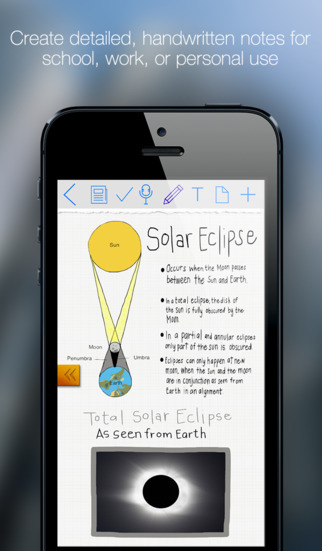
Meeting box is designed for the serious note-taker in mind. More than just another note-taking app, Meeting Box sets a new standard by also integrating a task manager, as well as map, photo, and webpage annotation. Menus are simple and uncluttered, and the interface is easy to use. Notes can be exported out of the application as PDF files, and shared by email or opened in another 3rd party application.
-Note-Taking Redefined
Meeting box is flexible, giving you the freedom to make your notes as complex or simple as you like. The drawing engine is smooth and fast, allowing you to add text, photos, highlighting, and more. Scribble, sketch, and embrace your creative side. Or simply use the built-in notepad to type to your heart’s content when your notes need to be fast and to the point.

– Form and Function
Meeting box embraces the idea that power comes from simplicity. The interface is designed to be elegant and minimalistic, maintaining a clean and fresh look. Organization is intuitive and clutter free as Meeting Box allows you to sort your notes and meetings into simple, yet efficient lists.

– Perfect for School AND Business
Meeting box is a great solution for students and working professionals. Capture your lectures or meetings with ease and style, and never forget another assignment or appointment again using built in tasks and reminders.
Meeting Box is perfect for lectures, college courses, work conferences, office meetings, journaling, and just about any other situation where you would want to capture something. Give Meeting Box a try today, and find out why it stands out above the rest!

News Microsoft Product Update Report : Microsoft Office 2016 To Launch On 22 September

After officially rolling out Windows 10, Microsoft is now gradually releasing updates to match up the new operating system. The company is rumoured to release the final version of the Office 2016 next month.

WinFuture learned from a source close to Microsoft that the company will launch Office 2016 on September 22. The report also claims to have sources inside Microsoft who provided them with a leaked screenshot of the company’s intranet site.

A page called the Office 2016 Launch Hub stated, “We’ll release Office 2016 with updates for Word, Excel, PowerPoint, OneNote, Outlook, Skype for Business, Project, Visio, Access, and Publisher. The innovation wave continues in Q2 with the release of E5 and Skype for Business, and on-premise servers will follow.” Microsoft has apparently already informed its employees in the last few days that the official launch for Office 2016 will take place end of September.

Back in June, Microsoft had released Office 2016 for Mac along with new apps for Android phones as well. An Office 365 subscription gets you – $70 for a single Mac or Windows PC at a time, or $100 for five. Mobile apps are free, though a subscription unlocks advance features that most people won’t need. Mac and Windows versions are sold the traditional way, too, with a one-time payment, though you can’t use Office on another PC without buying it again.

News Update On LOL & HAHA Factor : Haha Vs LOL - Facebook Finds Out Which 'E-Laugh' Rules

New Delhi: Which type of an e-laugh user are you? The frequent ‘LOL’ one or the ‘Haha’ one, or do you like to use ‘hehe’ or prefer sending emoji over text?

Social networking giant Facebook has published its data on the not-so-universal language of laughter which reveals that the written laughter varies by age and gender.
The study analysed de-identified posts and comments with at least one string of characters matching laughter. The regular expressions for laughter were automatically identified in texts, including variants such as haha, hehe, emoji, and lol.
 
It was found that the most common e-laugh was ‘haha’ followed by various emojis denoting laughter and ‘hehe’.

Young people and women prefer emoji while men prefer longer ‘hehes’. Across genders, both men and women used more of ‘haha’ and ‘emoji’, followed by ‘hehe’ and ‘lol’.

News Operating System App Update : Microsoft Sway Now Available To Everyone; Gets Windows 10 App

Microsoft on Wednesday announced the release of its digital storytelling app, Sway, to the general public. The app was until now under 'Preview' mode. The firm also introduced Sway's Windows 10 app along with a new layout and publishing features. The iOS app has also been updated.

For those unaware, Sway was first introduced in October last year. The app is used to create professional designs including images, videos and text together to make a story. It also comes with a compatibility engine that does not hamper the presentation whether it is viewed on a smartphone, tablet, laptop or PC. Users can even import content from social media websites like Facebook, Twitter, and Youtube. The app can be taken as an alternative to Microsoft PowerPoint. Also, it is the company's newest addition to the Office productivity suite, and is integrated with Office Online.
Users can simply sign in with their Microsoft account on Sway.com to get started, or download the iOS or Windows 10 app. There are not many differences between the Web and app versions. While the Web version would need a constant Internet connection, the Windows 10 version can be used offline as well. However, to import images and videos from Facebook, Twitter etc., it would require an Internet connection. Sway for Windows 10 can be downloaded from Windows Store. The Windows Phone version would be arriving in the 'coming months'.

Microsoft has added a new layout in Sway's navigation pane that "displays groupings of content (images, text, videos, tweets, etc.) one screen at a time." The company adds that, "Whether it's a few words with a knockout background image, a set of images and supporting bullet points, or a cluster of interactive elements, now you can deliver a killer presentation in-person or for viewing across many devices." Also, sharing a Sway presentation to Docs.com is also possible. "Along with adding support for Sway, we've also improved the overall Docs.com experience for publishing, managing and consuming content."

New features of the Microsoft Sway for iOS app include more sharing options, more publishing options, and more language options.

News Interesting Fact About Smartphones : Your Smartphone Can Tell If You’re Depressed

Health related apps have been on the rise in recent years as an increasing number of smartphone users are concerned with what they put in their bodies and what’s going on with their health. But most of them have been aimed at counting calories, counting drinks, keeping track of blood pressure, and none of them have targeted mental health. Until now.

Researchers at the Northwestern University have developed a smartphone app that can say whether or not an individual is depressed based on the amount of time that they spend using their phone as well by looking at GPS data in order to asses how many places the individual visits on a daily basis.
David Mohr, senior author and director for the Behavioral Intervention Technologies department of the Feinberg School of Medicine, Northwestern University, and his colleagues examined 18 subjects for this study. He included both men and women, with the ranging from 19 to 58.

The research team installed an app on the smartphones of participants and used it to track them over the course of two (2) weeks. However, before the app started collecting information, the subjects had to answer standard questionnaire that are used by professionals to measure depression.

The results revealed that the more time a subject spent using their phone, the bigger their change of being diagnosed with depression was. Depressed subjects spent somewhere around 68 minutes using their device each day, while healthy subjects spent somewhere around 17 minutes using their device each day.

On top of this, users with GPS data that showed they spent most of the time at home also had a good chance of being diagnosed with depression. Another finding was that subjects who changed their schedule from day to day (for instance heading towards the office at a different time each day) were also likely battling depression.

Mohr gave a statement saying that the results make sense from a clinical point of view. When people are depressed they don’t feel like engaging in social activities and that usually withdraw from others.

One explanation is that these people don’t use their phones to communicate, but rather to play on apps in an attempt to distract themselves from their emotional pain.

The authors admitted that further research is needed as the sample of subjects was a very small one.

News Apple iOS Update : How To Download The iOS 9 Public Beta

Apple’s iOS 9 public beta is now available to test, following its reveal at the company’s annual Worldwide Developers Conference (WWDC).

The new software for iPhone, iPad and iPod Touch has been designed to streamline everyday tasks and become more intelligent and attuned to your individual needs.
Signing up for the beta software programme with your Apple ID will allow you to test the system ahead of its expected full release in September, and report any bugs or errors as you may find. The first Apple products to ship with it are predicted to be the next generation of iPhones at the same time, going off previous release cycles.

As the beta is not a finalised version of iOS 9, some functions and actions may not work as expected and are subject to change ahead of the final roll out. The beta will receive periodic updates throughout the testing period.

How to do it :

Sign up to try the free beta here. You'll be asked to provide your Apple ID and agree to a terms of service. From there, hit "enroll your iOS device" on the "Getting Started" section.

Back up your current iOS data and then hit "Download profile", where you'll be prompted to install beta software. You have to do this part on an iOS device.

Once you've done that, go to Settings > General > Software Update to try it.

 The new public beta for Mac OS X El Capitan is also now available to download and test for free.

iOS 9 will see the introduction of new app News, which will replace Newsstand. News draws from respected news sources and publications to collate stories relevant to you, and will become increasingly refined the more you use it.

Other updates include photo, map and url-adding functionality to Notes, a new transit feature for Apple Maps and the transformation of Passbook into Wallet, where UK customers will be able to store credit and debit cards for use with Apple Pay.

Through iOS 9 the iPad takes on a new lease of life as a practical business-focussed tablet, with the introduction of simultaneous app-running feature Split View and Slide Over, which allows you to quickly dip into a second app, such as Twitter or your texts, without closing the window you’re currently working in.

When iOS 9 is available as a full download, it will require significantly less space than previous updates. iOS 9 will require 1.3GB of space, compared to iOS 8's whopping 4.58GB, and Apple has introduced a clever method of temporarily deleting apps in order to make room for the update to ensure as many customers are running the latest version of the software as possible.

Around 84 per cent of iOS devices are currently running iOS 8, while 14 per cent are using iOS 7. Only 2 per cent are continuing to run iOS 6 or previous iterations, according to Apple.

iOS 9 will be compatible with the iPhone 4s upwards, the iPad 2 upwards, both iPad Airs, all three iPad minis and the 5th generation iPod touch.

Hints and tips for downloading :
  • Ideally install iOS 9 on a secondary device. As it's not a full release, it might not have all the features you need.
  • Backup your device before installing.
  • Report any issues or bugs you find.
  • Be aware the beta will receive periodic updates during the time you use it.

News Update On Mobile Technology : Crave A Quiet Life? Headphone System Lets You Silence The World Around You For Instant Peace And Quiet

 A wearable technology company has created a new type of hearing system that enables users to adjust the volume of the world around them.

The Here Active Listening System was created by wearable company Doppler Labs, whose goal, according to CEO Noah Kraft, is to make it so you never have to deal with noise or a bad audio mix ever again.
 The system comprises of a two wireless earbuds that connect to a smartphone app via Bluetooth.  The app includes four features that let you control what you hear in real time.


  • Real World Volume Control: Use this to reduce or increase the volume of your surroundings, so for example you turn down office chatter to concentrate on your work.
  • Equaliser: Five EQ sliders let you adjust the bass, mids or treble of the sound around you. If you’re at a gig where you can’t hear the singer, for instance, you can adjust the treble to turn up the vocal.
  • Pre-set modes: Algorithms can suppress certain sounds, such as a baby crying, traffic, chatter or crowd noise at the tap of a button.
  • Sound Effects: Add effects such as flange, vinyl cracking and reverb to sounds at a concert.

 Kraft sees the system as a tool you can use to create the right listening experience for different environments.
“We all perceive sound differently, but everyone has been to a concert where the audio wasn’t quite right or has been subjected to a long flight with a screaming baby,” he said.

“Here changes all that, giving control back to the listener by allowing you to curate what you hear and how you hear it.”

 Music giants such as Live Nation, Universal Music Group and WME are backing the project.

Sound waves come in through the buds where they are modified using signal processing algorithms, before being played back. This process happens in less than 30 microseconds (faster than the blink of an eye), so the team claims you won’t notice any delay.
Available in three custom sizes, the buds last six hours and come with a charging chase that provides two existing charges.

After smashing its $250,000 (£160,300) Kickstarter target in the US in less than 48 hours, Doppler Labs has launched funding for the Here Active Listening System in Europe. The system currently costs $199 (£127), with the first units shipping in December 2015.

News Update : Very Soon, 'Selfies' To Verify Online Payments

Washington: MasterCard is experimenting with a smartphone app which allows people to confirm their identity and authenticate online transactions via a facial scan.

Users will have to download the MasterCard phone app and at checkout they will be asked to hold up their phone to stare and blink at it.
"The new generation, which is into selfies...I think they'll find it cool. They'll embrace it," said Ajay Bhalla, security expert at the American financial services company MasterCard.

Currently, users can set up something called "SecureCode," which requires a password when shopping online.

However, passwords can be forgotten, stolen, or intercepted.

MasterCard is launching a small pilot programme involving 500 people that uses fingerprints - but also facial scans to verify online transactions, 'CNN Money' reported.

MasterCard said it has partnered with every smartphone maker to make this method of verification possible. MasterCard said a pop-up will ask for authorisation after people buy something. They can choose fingerprint or facial recognition. Users who choose facial recognition have to stare at the phone and blink once.

MasterCard's security researchers believe blinking is the best way to prevent a thief from just holding up a picture of a person and fooling the system.

MasterCard said it does not actually get a picture of the user's finger or face. All fingerprint scans will create a code that stays on the device.

The facial recognition scan will map out a user's face, convert it to 1s and 0s and transmit that over the Internet to MasterCard.

Mr Bhalla said MasterCard is also experimenting with voice recognition, so people may be able to simply approve an online transaction by speaking to their phone.

MasterCard is also working with a Canadian firm, Nymi, to develop technology that will approve transactions by recognising a person's unique heartbeat.

News Social Network Update : Facebook Messenger No Longer Requires Facebook Account In Select Countries

As part of its continued effort to take over all of your communication needs, Facebook today tweaked Messenger to allow you to sign up without a Facebook account.

Facebook announced today that in the US, Canada, Peru, and Venezuela, you no longer need a Facebook account to sign up for Facebook Messenger. Instead, you can start using Messenger with just your name, phone number, and a photo.
Of course, Facebook would prefer you to sign up for a Facebook account, and it says that doing so will give you Messenger features like sync your messages across phones, tablets, and the web. It’s smart for Facebook to allow folks to sign up for Messenger without a Facebook account, though, because some people simply don’t want a Facebook account. And while some people won’t want a Facebook Messenger account either, others may appreciate being able to keep up with their friends on Facebook Messenger without needing a full-on Facebook account.

Do you use Facebook Messenger?

News Apple OS Update : At Last - iOS 9 Won't Make You Delete Your Apps To Clear Space For iPhone Updates

Handy inbuilt feature on Apple's new iPhone software will automatically delete and reinstall apps to free up space for large system updates

The days of deleting hundreds of photos from your iPhone to free up space for large software updates are over - thanks to a new feature within forthcoming operating system iOS 9.
Whereas in the past users were left frantically deleting the apps and elements which took up the most space, if you try to download iOS 9 on an iPhone or iPad with insufficient storage you are presented with a message offering to temporarily delete some apps so the software can be updated. The apps are then reinstalled following the download completion.

    hate that my phone has no space and i still cant download ios 8... never buying a 16gb ever again
    — El Max (@DesertScumbag) November 4, 2014

    Had to delete all these apps for iOS 8, just to download them right after it and still have space
    — Mik (@MikaylaaPaige) September 20, 2014

    I downloaded iOS 8 and it didn't even work and now I can't download it again because it's taken up all the space on my phone
    — Tom Bristow (@TomBristow2) September 20, 2014

    IOS 8: 5GB of free space for a 1.3GB download. iOS 8.1: 2.2GB of free space for a 120MB download. Seriously Apple. https://t.co/pClo8E17q0
    — Micah Singleton (@MicahSingleton) October 20, 2014

    The iPhone iOS 8 update only requires 7 GB of free space, a 10 X 10 storage building, and an empty tractor trailer to download it you guys.
    — Blunty Sarcastic (@Blunt_Sarcastic) September 29, 2014


Apple made a big point during its iOS 9 presentation at its Worldwide Developers Conference (WWDC) earlier this month that the new update would require significantly less space than its predecessor. Once it's publicly available, iOS 9 will require 1.3GB of space, compared to iOS 8's whopping 4.58GB.

How the iOS 9 app deletion message will appear
  
The update is a smart method of ensuring as many iOS users as possible are running the latest version of the software. Around 84 per cent of iOS devices are currently running iOS 8, while 14 per cent are using iOS 7. Only 2 per cent are continuing to run iOS 6 or previous iterations, according to Apple. 

Updating to iOS 9 takes nowhere near as much space as iOS 8

iOS 9 will be available as a public beta program from next month, and the first Apple devices to ship with it are expected to be the next generation of iPhones, predicted to be announced in September.

News Facebook Messenger Update : Games May Be Next Ffor Facebook Messenger

Facebook is reportedly looking to add games to its Messenger app. The social networking giant is having talks with game developers to integrate their mobile games with Messenger, according to a report from online magazine The Information.

Facebook officially announced support for third-party app integration into Messenger at its F8 developer platform in March. Since then, the company has partnered with a small number of third-party app developers, allowing users to add photos, animations and short video clips made with these third-party apps directly to their conversations.
Recipients of these messages get a link to install the apps, or reply with an image or animation of their own if they already have the app installed. Some of Facebook’s launch partners included JibJab, Giphy, ESPN and the Weather Channel.

Facebook is now looking to add game developers to that list, according to the Information, which spoke to three people briefed on those plans. However, it’s still unclear whether games will run directly within Messenger, or whether users will merely send invitations to play in a third-party app.

Asked about these plans, a Facebook spokesperson replied that the company is currently focused on content creation apps, but that the company plans to explore other opportunities in response to developer interest. She added that apps like Talking Tom, Giphy, Sound Clips, and Bitmoji have seen more than one million installs since the launch of the Messenger platform.

Facebook’s Messenger app has over 600 million active users and is a key part of the company’s strategy to focus on dedicated apps for communication and personal media — a strategy that also drove the acquisition of Whatsapp and Instagram.

Adding third-party apps to Messenger could one day be a big money-maker for Facebook; developers regularly pay top dollar to get users to install their apps. But it’s also a way for Facebook to compete with Apple’s and Google’s app stores, which could become less relevant if consumers instead get their recommendations for new apps directly from their social networks.

News Hacking Update : mSpy Hack - 400K Customers Of Smartphone Spy Tools Hit

An investigative journalist claims that smartphone spying software service mSpy has been hacked and personal details of 400,000 of its customers have been posted on the dark web.

mSpy is a service which allows users to monitor the activities of someone else's smartphone and is advertises as a way of "keeping your children safe and your employees efficient". It lets those using it to monitor someone's location, what apps they use, see what photos they take and record every word they type or speak.
Well-known and respected journalist Brian Krebs, who specialises in cyber-security reporting and - the dark web in particular - claims that mSpy's customer database has been hacked and "a huge trove of data" has been posted on the dark web, only accessible via Tor.

IBTimes UK has seen the post on the dark web but an update published on 15 May says that downloads have been "temporarily disabled" though no reason was given. One record remains with the name, home address, email address and other details of one mSpy customer though the huge cache of data is not available.

The anonymous hacker claimms the leak is "a full database" from mSpy's website including more than 400,000 users and featuring highly sensitive information like Apple IDs and associated passwords, tracking data, payment details, photos and more security information.

Krebs, who was sent a link to the post by a source, says the Tor-based site hosts hundreds of gigabytes of data "taken from mobile devices running mSpy's products, including some four million events logged by the software".

Krebs adds that from his investigations of the data dump, one thing is clear:

"There is a crazy amount of personal and sensitive data in this cache, including photos, calendar data, corporate email threads, and very private conversations. Also included in the data dump are thousands of support request emails from people around the world who paid between $8.33 to as much as $799 for a variety of subscriptions to mSpy's surveillance software."]

IBTimes UK has been unable to independently verify that validity of the claims.

In the UK, a 12-month subscription for a single smartphone monitoring service cost £60 while a "family kit" allowing you to monitor up to five devices (smartphone, tablet, laptop, desktop etc) will cost you £531.

No evidence of a leak :

Krebs said that numerous requests for comment from the company were not returned. IBTimes UK has also contacted the company for an official comment, but at the time of publication had not received a response.

However, on Friday, 15 May (a day after the report was published) we spoke to customer service representatives in the company's London call centre and online through the company's website chat function. They said they had been briefed about the situation and had been dealing with calls from worried customers who had read the report.

The spying company is telling its customers that there had been no breach of customer data, with the representative on the phone claiming such an attack was "not actually possible" because of the security measures the company has in place.

The company was clearly aware of Krebs' report, pointing out that one of the screenshots used in the report was from a demo version of mSpy which was freely available on its website. The representatives went as far as claiming the story had been fabricated.

"There is really no evidence of the leak" representative are telling mSpy's customers before adding that customers should not worry.

When asked why this report from a respected journalist had appeared if there was no truth to it, both representatives suggested it was the work of one of its competitors out to discredit the company. "We think it is a piece of black marketing," the online representative said. They added that the report was being investigated by people authorised to do so, and its lawyers.

iCloud credentials :

mSpy is headquartered in Mountain View, California with a call centre based in London and according to its website has over 1,000,000 customers around the world.

While the company advertises its software as being aimed at protecting children, one of the main uses of this type of software has been to spy on partners believed may be cheating.

mSpy can be installed on a non-jailbroken iPhone without even needing access to the physical phone itself as long as they have the iCloud credentials – though, as mSpy helpfully points out, "monitoring features may be limited with this solution option".

The company adds: "However, there may be some instances where physical access may be necessary. If you purchase mSpy for a jailbroken iOS phone or tablet, you will need 5-15 minutes of physical access to the device for successful installation."

Customers looking to review the data captured by the spying software can log on to their very own personalised Control Panel on the mSpy website from anywhere in the world.

mSpy helps those who don't want husbands or wives finding out that they are using it by listing it as AVANGATE in bank statements

Like any app developer, mSpy is continually looking to upgrade its offering, and a recent update now allows it to monitor Snapchat, Line and Facebook Messenger.
 
Support :. Copyright © 2015. The Technology Zone - All Rights Reserved
Template Created By Gourav Kashyap Proudly Powered By Blogger