Featured Post Today
print this page
Latest Post
Showing posts with label iTunes. Show all posts

News Apple Store Update : Apple: iTunes Store, App Store Outage Caused By 'Internal' Error

Summary:Reports from social media point to an extensive, widespread outage to its app and music download services. Apple is losing about $2 million an hour.

Apple is said to be experiencing outages across its stores, including iTunes and its App Store.

Users on Twitter are reporting outages across multiple countries and regions. The company's status page has "green" across the board, with the exception of the iTunes Store.

"Customers may be unable to make purchases from the App Store, iTunes Store, iBooks Store, or Mac App Store," it reads.
Issues have been reported since before 5am ET across all iPhone and iPad, and Mac platforms, and continued into the early afternoon.

In many cases, pages are displaying errors or "temporarily unavailable" notices, while apps and purchases are not going through at all.

Apple in a statement denied any foul play from a third-party, blaming an "internal DNS error."

The last instance in which Apple suffered extensive downtime was when a flaw was discovered in its developer portal. The site was shut down for weeks after an "intruder" attempted to take personal information. Many of the site's services were down for extended periods.

There's no indication, however, that the company has suffered a data breach or an attack on its systems.

Apple's App Store and iTunes Store, where the company makes about 6 percent of its global revenue from (according to its fiscal first quarter earnings, generated $4.8 billion in the three months ending December.

Though it's not a perfect figure because that division also includes Apple Pay and sales of Beats accessories, Apple is losing around $2.2 million for every hour the various stores are down. That said, the technology giant is more than making up for that dip in iPhone sale alone, based on figures from its fiscal first quarter earnings.

New Apple Applications Update : 15 Best iPhone Apps You’re Not Using

Chances are, your iPhone is already loaded with favorites like Facebook, Spotify and TwoDots, but there’s a wealth of exciting software to be found when you dig a bit deeper. The App Store is loaded with gems that will upgrade your iPhone for free or just a few bucks, whether you want to turn your handset into an intuitive filing assistant or a powerful camera. Here are our picks for the 15 best iPhone apps you’re not using yet.

1. Sleepio (Free) :
 Insomnia is a vicious cycle — you become stressed when you can't get to sleep, and that stress, in turn, prevents you from ever falling asleep. Sleepio is your own personal sleep coach, helping you break through those sleepless nights and wake refreshed. The advice is personalized to your needs, using the app's own sleep questionnaire paired with any available sleeping data from trackers such as UP, Fitbit or Bodymedia. Your own program is then generated, helping you overcome your sleeping roadblocks and get a full night's sleep.

From $0.00
iTunes > Sleepio (Free)

2. Google Translate (Free) :
 Language barriers can make international travel intimidating, but Google's Translate app will have you naturally conversing with the locals in seconds. The app can listen to two different languages and translate in real time, allowing you to set your phone on a table and simply chat with a foreign-language friend. Point your phone's camera at a billboard or sign, and the new Word Lens feature will instantly translate the text to your language — no Internet connection required.

From $0.00
iTunes > Google Translate (Free)

3. Day One ($4.99) :
 Day One is a beautiful and intuitive journaling application that makes it easy to keep a personal record of your day. Simply tap to create a new entry and start typing, then attach an optional image and save. Day One automatically adds the time, weather and other pertinent information such as location and music playing at the moment of your entry. You can sync your data among devices, view previous entries or instantly publish your content to a beautifully designed website. There's also a privacy passcode lock for those who want to keep their diaries to themselves.

From $4.99
iTunes > Day One ($4.99)

4. Overcast (Free) :
 Podcasts are radio reinvented, with the buzz causing water cooler talk about Adnan Syed's innocence or guilt to overshadow the latest episode of The Walking Dead. To join the fray of loyal listeners, you'll need a full-featured podcast app to access all your favorite shows. Overcast is the latest app by Tumblr co-creator Marco Arment, and it offers features such as Smart Speed, Voice Boost and cross-device episode syncing.

From $0.00
iTunes > Overcast (Free)

5. EasilyDo (Free) : 
 EasilyDo is your own virtual personal assistant, helping you manage your entire digital life. Simply attach your calendar and email account, and EasilyDo will monitor for upcoming trips and events, new contacts, shipment notifications, and other useful information. This smart app will auto-dial you into conference calls and bring up LinkedIn profiles of attendees, or RSVP to invitations. It'll show you directions and weather forecasts. You can even get daily recaps of the top Instagram and Facebook content from your feeds, making sure you never miss an important post.

From $0.00
iTunes > EasilyDo (Free)

6. Breeze (Free) : 
Breeze is a free app by RunKeeper that helps you stay active by tracking your activity using your iPhone's A7 chip. But unlike competitors, Breeze customizes your daily goal based on your previous week's activity, giving you encouragement to constantly break your own records rather than achieve some arbitrary pre-set step number. You can view your daily activity level against the current time, so it's easy to tell if you've been slacking on a particular day. Breeze strips out all the unnecessary charts and graphs, leaving you with just the motivation to keep on moving.

From $0.00
iTunes > Breeze (Free)

7. VSCO Cam (Free) : 
Take better pictures than ever on your iPhone, thanks to VSCO Cam. With the updated app for iOS 8, you'll be able to manually tweak settings such as focus, shutter speed, white balance and exposure compensation. Separate the focus and exposure rings for better photo composition. After the shot, edit your image with the app's tools and adjust the strength of each fix with a slider, and share your masterpiece with VSCO's community or Facebook and Instagram.

From $0.00
iTunes > VSCO Cam (Free)

8. Iconical ($1.99) : 
Wish your iPhone was as customizable as Android phones? Iconical is for you. This $1.99 app allows you to create custom app icons for all of your software, leading to a home screen you can truly call yours. One of Iconical's neatest features is the ability to make home-screen shortcuts for your app so you can get right to Create Tweet or Compose Email with a single tap of the screen.

From $1.99
iTunes > Iconical ($1.99)

9. Dark Sky ($3.99) : 
Dark Sky uses state-of-the-art weather forecasting to predict when it will rain or snow. Most weather apps provide an hourly breakdown, but Dark Sky takes that even further by making weather predictions down to the minute. The app also displays a real-time radar emission to show exactly where the storm is moving, and sends a notification alert just before it's about to rain at your location. This handy companion has gained some new features for iOS 7, including extended 24-hour and 7-day forecasts, and new global maps.

From $3.99
iTunes > Dark Sky ($3.99)

10. Dayre (Free) : 
It's like Tumblr for your phone but prettier. Record snippets of your life by taking a photo, video, sound clip or jotting down some notes. Then, publish it to a site made for you by Dayre, which also gives you a personal URL so your friends can follow your exploits. The built-in stickers and beautiful designs make blogging a simple, happy affair.

From $0.00
iTunes > Dayre (Free)

11. Horizon ($1.99) : 
If vertical iPhone videos make you cringe, Horizon($0.99) is a must-download. This camera app allows you to record horizontal videos in portrait mode, using your iPhone's gyroscope to keep your camera parallel to the ground at any angle. You can use Horizon to shoot in three aspect ratios (1:1, 16:9 or 4:3), and the app packs eight filters for a dash of customization. In case you're especially excited about your always-horizontal videos, Horizon supports sharing via Instagram, Facebook and Twitter.

From $1.99
iTunes > Horizon ($1.99)

12. WeChat (Free) : 
While most carriers offer unlimited texting, sending messages over your smartphone's stock app is usually a plain and limiting experience. The free WeChat app offers a sleek all-in-one portal for sending texts, making video and voice calls, leaving voice messages, and partaking in group chats. It doesn't end there, as WeChat packs loads of animated emoticons and a walkie-talkie feature that lets you tap to talk with up to 40 friends. WeChat uses your phone's data plan, but you can enjoy all of its features for free over Wi-Fi.

From $0.00
iTunes > WeChat (Free)

13. Fleksy Keyboard ($0.99) : 
Sick of your boring old iOS keyboard? Fleksy will not only add a refreshing new look to your type pad, but it will help you type faster than ever too. In addition to swipe typing and gesture shortcuts to add punctuation or special characters, Fleksy's deck is also resizable to give you more screen space while you type. The keyboard's next-word prediction and autocorrect engines are so accurate that you can even type without looking at the screen - your gibberish will be intuitively fixed.

From $0.99
iTunes > Fleksy Keyboard ($0.99)

14. Wikitude (Free) : 
Thanks to Wikitude, you'll never be bored in your city again. This augmented-reality (AR) app pulls up information on bars, restaurants and landmarks based on what your camera sees. With Wikitude's filters, you can set the app to only find you the best pubs or most interesting events going on in your area. And in case you get bored strolling around town, the app packs a variety of AR games, like "Alien Attack" and "Bubble Tap," that let you have some fun with your surroundings.

From $0.00
iTunes > Wikitude (Free)

15. Doorsteps Swipe (Free) : 
Touted as Tinder for real estate, this app is a savior for those looking for a new apartment or house. Houses or rooms are presented in a deck of cards and you swipe left or right to save or pass respectively. Even if you're not in the market for a new place, Doorsteps Swipe can give you a good idea of what is available. It also studies your swiping behavior to tell you what kind of houses you have tended to pick. Search houses in your immediate vicinity based on your location, or draw up a region on the app's map.

From $0.00
iTunes > Doorsteps Swipe (Free)

New Apple OS Update : iOS 9 Reportedly To Focus On Stability More Than New Features

Apple may use iOS 9 to add greater stability and performance enhancements to its mobile operating system.

Expected to be unveiled at Apple's Worldwide Developers Conference in June, iOS 9 will come packed with a number of "under-the-hood" improvements, according to 9to5Mac, which cited info from anonymous sources. A "huge" focus reportedly will be more on squashing bugs, ensuring stability and tweaking performance rather than just throwing in a bunch of new features.
Assuming the report is true, it would be a welcome change from the usual strategy of just cooking up a host of new features. Apple bumped into a slew of technical troubles with iOS 8, released in September, that frustrated users and forced the company to keep issuing one update after another over the course of just a few months -- from iOS 8.0 to 8.1.3. The pace of iOS 8 adoption has been slower than that of iOS 7, possibly because of all the bugs and frequent updates. So the time may be ripe for Apple to pull back and roll out a more stable and bulletproof OS to address the complaints with iOS 8.

One issue that hampered iOS 8 adoption was the storage space required just to upgrade. iOS 7 users needed at least 5.7GB of free space to store and install the latest version, a limitation that wasn't fixed until version 8.1.3. For iOS 9, codenamed Monarch, Apple will strive to keep the size of both the OS and its updates more manageable, 9to5Mac said, a factor that should help users who have only 16GB of storage on their devices and are low on free space.

One key question: which devices will iOS 9 support? Each new version of Apple's mobile OS typically is incompatible with certain older models. For example, iOS 8 does not support the iPhone 4 and older iPhones, the fourth-generation iPod Touch and older models, and the original iPad. Apple also typically discontinues some older models as it rolls out new iPhones and iPads.

If the iPhone 5C, the original iPad Mini and the fifth-generation iPod Touch are given the boot later this year, then all of the devices in Apple's lineup would be running the 64-bit A7, A8 or A9 chips, according to 9to5Mac. That would ease iOS development for Apple and outside developers, another factor that could help better stabilize the operating system and overall environment.

New Apple iOS Update : iOS 8.3 Has Wireless CarPlay, And 8.4 May Have iTunes Streaming

Earlier today, we heard an interesting rumor about iOS 9, which is said to offer up stability solutions rather than more features for us to play with. We’re a long way off from iOS 9, though, which leaves plenty of time to actually get us more features built into iOS for our iPhones and iPads. With iOS 8.3 already in testing and packing in some CarPlay functionality, it seems iOS 8.4 just might bring us that iTunes streaming service we've long been looking forward to.
The first of the iOS updates, iOS 8.3, is said to offer up CarPlay wireless functionality, so you can connect your phone to your CarPlay-enabled stereo system wirelessly rather than plugging in. The update also brings Google account log-in for use with two-factor authentication.

Apple’s iOs 8.3 has been seeded to Developers as a beta. It’s not clear when it might roll out, and we still actually need iOS 8.2 first, so don’t hold your breath.

With iOS 8.4, it seems we may be getting that iTunes streaming service that could be a Beats/iTunes combination straight from heaven. According to 9to5Mac, the iOS 8.4 update will come after the Apple Watch (which is all but confirmed for April), and is the update Apple is earmarking for launch of their Beats-inspired streaming service. None of the iOS 8.4 talk can be confirmed, obviously, but it puts Apple’s streaming efforts as launching right around June or so.

In updating to iOS 8, we were given a lot of new features. It makes sense Apple would continue to give us features incrementally with iOS 8 iterations should iOS 9 really concentrate on stability and bug fixes. Just keep in mind they’re not around the corner, though.

New Application Update : iTunes 12.1 For OS X Update Brings Notification Centre Widget

Apple has rolled out an update for iTunes for OS X, bumping it to version 12.1.0.50. It also added a new widget for easy music playback options. Users can enable the widget by opening the Notification Centre and tapping the Edit button. 
The new Notification Centre widget introduced in the iTunes update appears similar to the iTunes MiniPlayer. It includes basic playback options to play, pause, skip and buy audio tracks - the widget shows the audio track price on the right side if listening to a song on iTunes Radio, tapping on which asks users to authenticate the song with iTunes and buy it.

The design of the iTunes widget is simplistic as it only shows the track length, name of the artist and the song along with the few playback buttons mentioned above. The new widget however misses on some other features like volume adjustment, track listing and more that are available in the iTunes MiniPlayer. 
Apple, as a part of the iTunes update, has also announced improved performance when syncing audio files with iOS devices, namely iPhone, iPad and iPod. The iTunes 12.1 app is available for OS X devices and can be downloaded from the Mac App Store.

On a related note, Apple last month was reported to have introduced a new 14-day "no-questions-asked return policy" for purchases through its App Store, iBooks, and iTunes. The report claims the new 14-day return policy is now available in several European countries such as Germany, France and the UK among others. Apple is yet to officially announce the new return policy.

Hands On With Apple iTunes 11: Is This Apple’s Best iTunes To Date?

Apple's recently developed upgrade to iTunes is here. We took a hands-on look too see what's modified with iTunes 11, and we can securely say we liked what we saw.

After each 30 days wait, iTunes 11 was lastly launched last night. As we formerly revealed, the new edition was delayed due to an technological innovation issue that pressured Apple organization designers to take a while to restore the program.The organization had declared the new upgrade and many of the predicted functions returning in Sept at its iPhone 5 occasion, but it was not until we actually got some hands-on time with the new iTunes that we were really able to understand what a significant modify this is for the songs app.

An app used by both Mac and PC customers alike; iTunes gets a lot of use, so let us see what an additional 30 days permitted Apple organization to do. Here are some of iTunes 11’s new functions.

New MiniPlayer :

The MiniPlayer could be one of the greatest changes or one of the most small – based on how many people recognize it has actually been modified. MiniPlayer is one iTunes function that often went rarely used the way it did not have much performance before. In past editions of iTunes, the MiniPlayer basically permitted customers to reduce their iTunes display and convert it into a little gadget. The MiniPlayer revealed the music name and permitted customers to stop, perform, and convert ahead or in reverse between songs – and that is about it. With iTunes 11, MiniPlayer has not only improved its performance but it also modified its look.   
 
Apple has invisible the forwards and backwards control buttons, the play/pause key, and the quantity control buttons so that they only appear when you float over the MiniPlayer. Other new improvements consist of a look for bar, which queries your whole library; an sound selection, which allows you to choose your sound program via AirPlay; and a record of songs you have included to your Up Next selection (more on Up Next below). The modified MiniPlayer might be one of the most overlooked functions on iTunes 11.

No more library sidebar :

The way you get around through the collection is probably the greatest modify to iTunes. The sidebar, which has been a choice in the application’s record, is gone, making a large huge of area for your record art to take over. If you want to change between songs, films, TV reveals, house discussing, or program collections, there happens to be slim drop-down selection in the upper-left area of the app. The only issue is, it creates it more challenging to get around through video clips, songs, TV reveals, applications, and the iTunes shop. It’s a little compromise for the included display area and, after you see how much better the app is, successfully, you will be hoping Apple organization applied this function decades ago. 
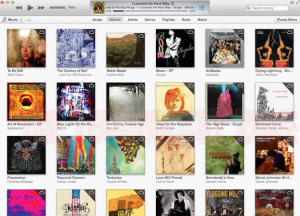
Since the sidebar is gone, the playlists function has modified. On the top of the collection, there are an eye that allow you to get around between performers, styles, songs, collections, and playlists. The performers and playlist selection carry up less sized sidebar, which provides a record of whatever playlist or specialist you are looking for. We use playlists a lot and discovered this modify to be just as effective as the old sidebar.

For those of you who really like the sidebar and cannot stay without it, Apple organization has not gotten rid of it absolutely. By going to the Perspective selection and basically clicking “Show Sidebar,” the sidebar will come back in iTunes. You can also use the selection to restore the position bar on the end that claims how many songs, time of songs, and mb of songs you have submitted on iTunes. You’ll also find an choice to see “Up Next,” a new function that reveals you what exactly is arriving up after your present music. You can add songs to Up Next by right-clicking on the music and choosing “Add to Up Next.” The music will be included to the end of your playlist, but if you want to pay attention to it straight after the music you are currently performing out to, then you can choose “Play Next.”

Both the iTunes Store and iTunes Go with are also available from the top of the collection. iTunes Go with expenses $25 a season and shops your whole collection in iCloud, which allows you perform your songs and video clips on any iOS program and your Apple organization TV.

iTunes Store looks the same on all iOS gadgets … finally :

Speaking of the iTunes Store, for some purpose, the OS X edition was different from the iOS edition in past versions of Music. Not a big cope for some, but type of a pet peeve for others. Now, Apple’s synced up the iTunes style so that it looks the same on all gadgets, no issue if they are operating iOS or OS X.

Expanded view: a new way to look through through music :

Expanded view changes the way you dig through songs. It performs a lot like the iOS directory mechanism: simply simply select the record protect, and a record of songs begin below the record. 

Also, the material that have been a choice of iTunes, which permitted customers to type their information through various groups, like last performed, time frame included, season, ranking, and more, are absolutely gone. However, you can get it returning using the Perspective selection while you are in the Songs area.

Preview history : 

ust like with iOS 6, Apple organization has included review record, enabling customers to see the songs they have previewed on one program on another program. So, if you are surfing around through songs on your iPhone while on the go, you can actually obtain the music on your pc once you get house and preserve the stress of trying to keep in mind what it was. Thanks to iCloud, the music will be stored in your review record.

More iCloud functionality :

iTunes 11 allows you accessibility your iTunes material on all of your iOS gadgets. Users can now obtain songs from their collection for off-line use, which can be useful when journeying. iCloud also recalls where you remaining off, so if you are viewing a film on your MacBook but have to run out the entrance, you can proceed viewing on your iPhone and begin from the actual identify you remaining off. Apple’s iBooks and Opera – and even well-known third-party solutions like Blockbuster online – have had this function for decades, and while it’s taken a while for iTunes to get on the bandwagon, it’s certainly a welcome inclusion.

Speed :

iTunes 11 is probably the quickest edition of the program we’ve seen yet. From operating up and choosing songs, to installing and enjoying video clips, iTunes 11 is much quicker than its forerunners. However, Apple organization did a little bit improve the quantity of CPU it uses to make the app quicker. According to our assessments, when enjoying songs on iTunes 10, the program took around 5 % of our CPU. In iTunes 11, iTunes requires up to 7.5 %. We did a identical check for video clips by enjoying the lead show of “Revolution.” The duplicate we used was downloadable from the iTunes Store and is high-def excellent. The program took up about 20 % of our CPU with iTunes 10, and 21 % with iTunes 11. Clearly, this is not a big modify, but it’s essential for customers with more slowly, mature, pc systems.

Devices :

With the sidebar gone, your gadgets are now available in their own little tab in the higher right-hand area of the display. If you have more than one program, you will be able to handle them by hitting the gadgets tab, which delivers up a drop-down selection of all of your linked gadgets. A very acquainted display comes up that appears like the product web page from mature editions of iTunes. There is one addition: a tab that says “On This Device,” which gives you a explanation of exactly what exactly is on each program. It’s a welcome inclusion that places everything on your iPad, iPod, or iPhone into a simple record that is simple to get around.

Gift cards reader to come? : 

According to CNET, there is one more function arriving out in the next step-by-step update: a coupon reader. Allegedly, the function will let you use your iSight photographic camera to add present certificates to your consideration. Though it’s not currently available, iTunes will take the alphanumeric value on the coupon so that you do not have to type it in. To be able for it to work, the value must be printed within a rectangle-shaped box for the photographic camera to identify it. Users can still type in the value in situation the iSight photographic camera does not choose it up.

Should you get iTunes 11? :

In a term, yes. iTunes 11 is a amazing upgrade. Apple organization has created it a lot quicker, streamlined, and included many new functions. The elimination of data-filled material and the sidebar keep the display organized and much quicker to get around. iTunes 11 looks like something patterned after Apple’s iOS style, which is just a extension of Apple’s pursuit to make a specific os between its cellular phone gadgets and pc systems. It proved helpful with Hill Lion, which included key iOS functions like Alert Middle and iMessages, and it certainly performs with the new iTunes upgrade. Clearly, CEO Tim Prepare, and Apple organization professionals Jony Ive and Eddy Cue will work carefully to force Apple organization into the long run. And, if the long run of Apple organization looks as great as iTunes 11, we cannot help but be thrilled.

Report : What’s New In iTunes 11

All New Selection :
Your music library is going to see a update in iTunes 11. Surfing around is much more user-friendly, and can be categorized more properly based on what you are looking for in your collection. 
Expanded Perspective :
When you choose an record in iTunes 11 that record will increase in place. Say, for example, you simply select Maroon 5’s ‘Overexposed.” Hitting the protect art for the record will start a drop-down readable show of the whole record finish with celebrity scores, costs, and playtime for each monitor. 
Updated MiniPlayer :
The MiniPlayer in iTunes is seeing an update. Now you can see what music are coming next in your playlist by hitting on an symbol on the small screen, as well as search your music collection for new paths. 
Better Recommendations :
Need assisting figuring out abut new music? Now choosing an record, category, or specialist you like will bring up suggestions on music that The apple company believes you might also be thrilled about. 
Preview Record :
Preview a new amazing music last night, but do not keep in mind what it was today? A new Review Record function in iTunes allows you see what you have examined out on your pc as well as your cell phone while you are out on the city. Review Record is synced across gadgets using iCloud, so if you pay attention to a monitor on your phone you can buy it later on your desktop pc or viceversa. 
More Public :
Facebook incorporation allows you keep on top of what applications your buddies like in the App Shop. 
More iCloud Functions :
iCloud will shop available immediately across all of your gadgets, and will allow you to do things such as start a film on your iPad and choose up where you remaining off on your pc when you get house.

Along with the iPhone 5, The apple company declared a new edition of iTunes on Wed. The next-generation of the music application contributes a number of capabilities that create the program both simpler to use and more social.

“We designed iTunes because we love music and we’re going back to our origins with an amazingly fresh design that keeps your music at the leading edge,” said Eddy Cue, Apple’s mature v. p. of Internet Software and Services in an argument stating the new edition of the program.

iTunes 11 is set to launch in Oct –- possibly together with a yet-to-be-announced iPad small. Check out the collection above for a look at some of the characteristics that are advancing you way.
 
Support :. Copyright © 2015. The Technology Zone - All Rights Reserved
Template Created By Gourav Kashyap Proudly Powered By Blogger