Featured Post Today
print this page
Latest Post
Showing posts with label Tablet. Show all posts

News Update Apple Mac Pro : Apple Stores Are Holding The New MacBooks Captive

The major design feature of Apple's new MacBook is its low weight. To hold it in one's hand, untethered, is to appreciate the significance of the design. So why shouldn't Apple let customers walk around the store with one and test the keyboard for awhile? Here's my argument.

It's been said that the new MacBook is actually the long anticipated iPad Pro. By that observers mean that the low weight, OS X power for traditional activities and the 12-inch screen rival what one could expect to do with the 12.x-inch iPad Pro. Many think Apple will release that iPad Pro in a few months to breathe new life into the product line. But I digress.
Today, this blurring of the weight penalty for a modern notebook Mac like the MacBook is an astonis

Image credit: Apple


The major design feature of Apple's new MacBook is its low weight. To hold it in one's hand, untethered, is to appreciate the significance of the design. So why shouldn't Apple let customers walk around the store with one and test the keyboard for awhile? Here's my argument.

It's been said that the new MacBook is actually the long anticipated iPad Pro. By that observers mean that the low weight, OS X power for traditional activities and the 12-inch screen rival what one could expect to do with the 12.x-inch iPad Pro. Many think Apple will release that iPad Pro in a few months to breathe new life into the product line. But I digress.

Today, this blurring of the weight penalty for a modern notebook Mac like the MacBook is an astonishing and pleasing thing to discover. Right away, one's brain says, I would love to be mobile, to travel with this Mac.

I weighed my iPad Air with its folio cover (Macally Clear Case). The total weight is 684 grams (1.50 pounds). That seems like a fair comparison because the MacBook also has a lid that closes to protect the display. Meanwhile, the naked MacBook weighs 910 grams (2.0 pounds). When the weights are this close, something clicks in the brain about the portability and desirability of the MacBook.

L: iPad Air at 1.5 lbs with folio case, R: naked MacBook at 2.0 lbs

Apple Stores Say No

However, in the Apple retail stores, these majestic MacBooks are tethered to the tables. About all one can do is lift one up for a bit and then stoop over and fiddle with the keyboard. Its a tiresome process. Indeed, I already wrote about important it is to spend some quality time with this excellent keyboard. "Eight Weeks With the MacBook Keyboard: Total Love."

What the customer really needs to do is walk around the store with one, put it in a backpack or briefcase, sit on the floor in a corner or sit on one of the high stools near the genius bar and type for 20 minutes. Hold it. In fact, fondle it at length. Free from its bindings.

Now I know what you're thinking: the security aspects of letting a customer walk around with an untethered MacBook are a challenge. One of them might just continue walking, right out of the store. However, if the salesperson really wants to close the deal, he or she could accompany the prospective customer during this sales opportunity.

It's also a chance to more fully engage the customer, answer questions and demonstrate features such as AirPlay, AirDrop and AirPrint. The impact of those technologies is huge when the MacBook rests in the lap, not wired to a table.

Sure it's a challenge, but in grand scheme of challenges for Apple, this seems like a small one. For example, one could limit the number of untethered MacBooks to one or two at a time. (And have Find My Mac turned on.)

This new MacBook is beautiful and desirable by virtue of its two pound design point. Just like the Apple Watch, which one has to actually try on to appreciate, the MacBook needs to be "tried on" in a real world scenario.

Otherwise, it becomes a lonely, small, hamstrung device. Chained to a table. Aching to be carried around and typed on for awhile, but unable. It longs for a great escape.

Right into the customer's shopping bag.

News Product Launch : Lenovo Yoga Tablet 2 With Windows: Write On The Screen With Any Pen Or Pencil

Summary: This 8-inch Windows tablet is the first with Lenovo's Anypen technology that enables using any pen or pencil to write or draw on the screen. We go hands on with it to see how it fares. 

Yoga Tablet 2

At the CES earlier this year Lenovo proudly showed off the new technology for touch tablets that permits writing on the screen with any pen or pencil. The Anypen feature is designed to work like tablets with special pens for drawing and writing on the screen.
The Yoga Tablet 2 is the first touch tablet from Lenovo with this technology. The 8-inch Yoga is much like the company’s other Yoga tablets with a cylindrical handle on one edge that houses the camera, kickstand, and a large battery. It ships with Windows 8.1 with Bing and is priced at $299.99.

Yoga Tablet 2 hardware specs as reviewed:
  • OS: Windows 8.1 with Bing
  • CPU: Intel Atom Z3745, quad core, 1.33GHz
  • Display: 8-inch IPS, 1920 x 1200; Anypen (write with any pen or pencil on screen)
  • Memory/storage: 2GB/32GB
  • Connectivity: Wi-Fi a/b/g/n; Bluetooth 4.0
  • Ports: microUSB, microSD (up to 64GB); 3.5m audio
  • Battery: 6400 mAH; 24 WH; 15 hours
  • Cameras: Front - 1.6MP; Rear - 8MP
  • Weight: 0.94 lbs
  • Price: $299

Good Windows tablet:


The construction of the Yoga Tablet 2 is very solid. While it feels like premium metal, the case is constructed of plastic. It is easy to hold for long stretches, especially using the cylinder on the side of the tablet in portrait.

The kickstand flips out of the cylinder with a little finagling, and forms a multi-position stand. This permits using the Yoga Tablet 2 at a low angle for handwriting, upright for viewing the screen, and hanging from a hook. Popping out the kickstand exposes a door covering the microSD slot. This slot handles cards up to 64GB, which will be needed given the 32GB internal storage.

Windows 8.1 runs very well on the Yoga due to the Intel processor. It’s one of the best Windows tablets I’ve used due to good performance, the nice display (1920 x 1200), and the kickstand. The start screen flows smoothly, as do most apps. With only 2GB of memory, it is surprising that it runs so well. That might not be the case if a lot of apps are run at once. It is a joy to use the Yoga Tablet 2, especially given the low price of $299.99.

Lenovo estimates the battery life at 15 hours, and in testing that’s what we experienced. The long battery life is due to the cylinder on the tablet which can hold a bigger battery than other thin tablets.

The cylinder also houses the rear camera and big power button that lights up when charging. Close to the cylinder are the Windows Home button on the left, and the microUSB charging port and volume buttons on the right.

The Yoga Tablet 2 has a decent audio system for such a small tablet. The stereo speakers are on the cylinder facing the front. Audio is not overly loud but louder than most tablets we’ve tested.

Anypen - where’s the rejection?

When Lenovo unveiled the Anypen feature at the CES earlier this year it sounded like a new pen technology that would work like active digitizers with special pens. In reality, Anypen is a touch digitizer that in addition to operation by fingertip, can also be used with standard pens and pencils.

This works OK, but writing on the screen with a pen/pencil is sometimes hit or miss. If you press down a little harder than normal it works better.

There is no special software for using Anypen on our review unit; it is handled by Windows 8.1. Handwriting is done through the Windows pen text entry panel, which works as we expected. Handwriting and drawing with a pen or pencil can also be done in any app that supports the activity. Drawing and inking in OneNote works as expected.

Anypen is simply a touch screen that allows pen/pencil use for more precision than possible with a fingertip. It doesn’t add extra features to touch control of the Yoga Tablet 2. Using a pen is like using a stylus on a touch screen but in our testing this often resulted in missed taps and we resorted to using the old fingertip to work the interface.

While writing on the screen in apps like OneNote using a real pen is cool, it doesn’t work well due to the lack of palm rejection. That’s the technology that ignores the hand when it’s resting on the page and only registers the pen input.

Long-time tablet users know how important palm rejection is for inking on the screen. Without it, writing with a pen is unnatural as you must keep your hand off the display and only touch it with the pen tip. That’s the case with the Yoga Tablet 2, and it’s a big failure to not have palm rejection. This reduces Anypen to largely a gimmick that is not practical for use.

In conclusion:

The Yoga Tablet 2 is a nice Windows tablet, especially for the low price. It is fluid in operation, and the 8-inch display is great with Windows. The battery life is outstanding, and the integrated kickstand rounds out the offering.

Anypen is an interesting gimmick, but as implemented it's not practical for either controlling the Windows interface nor its intended use for handwriting on the screen. The lack of pressure sensitivity makes it useless for drawing on the display, which is virtually impossible without palm rejection.

On the plus side, the Yoga demonstrates what we found when testing the Dell Venue 8 tablet, that 8 inches is a good size for a Windows tablet. The display is large enough for easy viewing, yet small enough for comfortable use.

The Yoga Tablet 2 is a good value for $299.99 with Windows 8.1. It comes with a license for Microsoft Office 365.

Pros:
  • Fluid performance
  • Good price
  • Long battery life
  • Microsoft Office 365 license included
Cons:
  • Anypen
  • Lack of palm rejection
Reviewer’s rating: 8 out of 10

Lenovo sent us the optional sleeve for the Yoga Tablet 2 which is priced at $29.99. Since the cylinder on the tablet precludes the production of any type of smart cover case, buyers will likely want the sleeve to protect the tablet when out and about. A photo of the sleeve is included in the gallery above.

Photo Gallery:


News Tablets Update : Top Ten Best Business Tablets In World (Explore Our Top Ten Choices Of The Best Business Tablets Available)

Explore our top ten choices of the best business tablets available.

We all know that tablets are fast-becoming an ever-present force for good, which is especially true in the business world. With the amount of increasingly-obsolete hardware being cut down in offices worldwide, the switch to handheld, mobile technology is an entirely welcome one.

But with the tablet marketplace bustling, the process of selecting which is best for your business may appear to be quite a daunting task. Here to offer some guidance on the matter, then, is our top 10 picks of the best business tablets available.

1. Apple iPad Air 2 : 
An obvious choice perhaps, but its many, many capabilities – not to mention its sleek design, user-friendly interface and market ubiquity – make it the perfect companion for business. The recent addition of Microsoft Office on the App Store has strengthened its cause further as a vital aid for business, while an agreement between Apple and IBM has laid the groundwork for the imminent arrival of enterprise software on the device.

2. Lenovo ThinkPad 10 :
 
This Windows tablet is certainly business-friendly. Its 10.1-inch frame is the ideal size when it comes to portability, whilst its design is both classy and professional. Stocked with a number of ports – audio jack, micro HDMI, USB – and an accompanying stylus, its high performance and strong functionality make it a fine choice for business use.

3. Samsung Galaxy Tab S 8.4 : 
Standing at just 8.4 inches (and with a miniscule depth of 6.6mm), Samsung’s mini version of the Galaxy Tab S is testament to the oft-quoted idiom that size doesn’t matter. Extraordinary measurements aside, the Galaxy Tab S comes equipped with an OS that permits multitasking between apps, secure support for Samsung’s KNOX security suite, and fingerprint scanner – your business is certainly safe with this svelte device.

4. Microsoft Surface Pro 3 : 
Those who currently use Windows laptops will find the transition to tablets particularly smooth if they invest in a Microsoft Surface Pro 3. Microsoft’s bold assertion that they’ve managed to cram the power of one of their laptops into this tablet is something that’s definitely worth investigating. With its inbuilt Windows 8.1 OS, an impressive keyboard (that doubles up as the tablet’s cover) and 12-inch screen (complete with stylus), the Surface Pro 3 can easily become your new personal computer both in and away from the office.

5. Google Nexus 9 : 
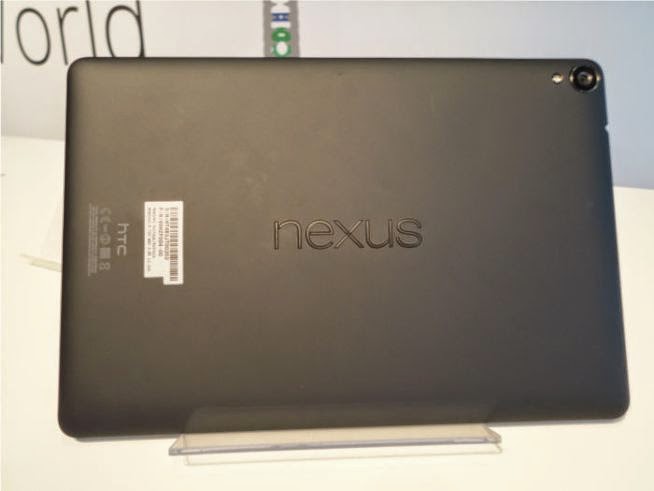
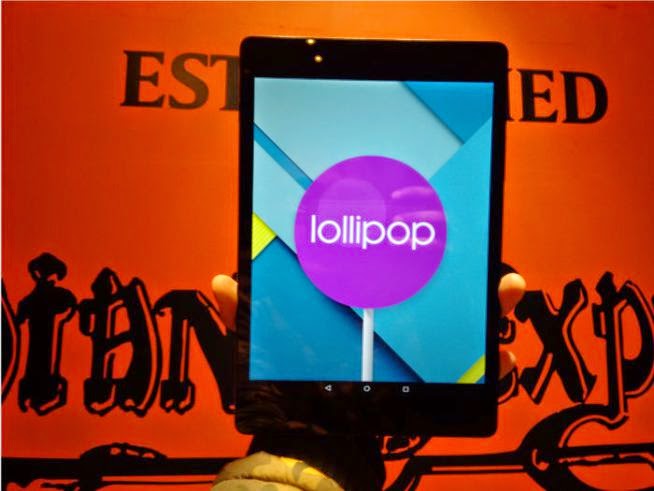
Google’s foray into the high-end tablet market is currently being led by the Nexus 9, and it could very well benefit your business needs. Designed by HTC and running on Android’s 5.0 Lollipop OS (currently the only tablet on the market to be doing so), it’s a fast and smooth tablet experience that offers the kind of professional, reliable service that you’d expect from its enhanced cost.

6. Dell Venue 8 7000 : 
More of a slate than a tablet, this smaller device could be your new method of note-taking and card-reading during those important, business-y presentations that you’re so fond of doing. Extremely portable due to its 6mm thickness, it’s an Android-powered, 8.4-inch, MicroSD slot-carrying option that’ll help you be productive like nobody’s business – once you’ve added a keyboard and stylus, that is.

7. Sony Xperia Z3 Tablet Compact : 
Smaller than its Z2 sibling, the Z3 can ably support app-based solutions that can help your business operate at a speed that’s flexible to you. Its customisable Android software lets the tablet work around you rather than vice versa, whilst its thin, 8.3-inch screen ensures that it won’t take up too much room whilst you’re on the go. Plus, did we mention that it’s waterproof? So now you no longer have to fear the wrath of the errant puddle whilst dashing from coffee shop to meeting room.

8. ASUS VivoTab Note 8 : 
Another slate in our list, this offering from ASUS comes with a built-in stylus, pressure-sensitive display, and a quad-core processor with 2GB of RAM. Impressive, if you’re looking for a relatively powerful tablet that you can scribble notes and draw graphs on, all whilst running on the recognisable Windows 8 software that you’re most likely already quite familiar with.

9. Dell Venue 11 Pro 7140 : 
Arriving last November to rave reviews, Dell’s flagship tablet is lightweight yet powerful – a paradox well worth investing in. Powered by an Intel Core M Broadwell processor, it’s a highly-capable device that earns extra points from its all-day battery life and in-built Dell security suite. Although not the most popular of tablet manufacturers, Dell’s offering may be the perfect fit for your business.

10. Samsung Galaxy Tab Active :
 
Run a business where you’re always on the go, or one that doesn’t exist purely in an office? The sturdy Galaxy Tab Active may be the device for you. A rugged tablet with water and dust resistance, as well as anti-shock/drop protection, it’s ready-made for your active business needs, whether you work on a building site or at a luxury watersports company. Set to meet both the productive and business demands of your day, it’s an option that could work wonders in the right setting.

New Product Launched : Samsung Launches Four Phones For India, Galaxy Active Tab

Samsung seems to be finally waking up to the threat of affordable 4G devices in markets like India. The Korean tech giant, which has been facing the heat from Chinese entrants in its pocket boroughs, on Monday announced four new smartphones at its Samsung Forum 2015 in Bangkok.
The new phones include a mid-range Galaxy  A7 priced at Rs 30,499 and touted as the thinnest Galaxy phone yet. The 4G devices include the 5-inch Galaxy Grand Prime 4G, 4.5-inch Galaxy Core Prime 4G and Galaxy J14Gbwith a 4.3-inch screen. The phones will be priced upwards of Rs 9900 and will be available from March.

The company also announced the availability of the enterprise oriented Galaxy Tab active in India with dust and waterproof capabilities. The tablet will come to India at a price point of around Rs 52,000.

Vice president of Samsung India Asim Warsi said the company will have new features in its 4G phones like download booster and dual SIM. The company now has a full bouquet of 4G devices.

New Product Launched : Google Nexus 9 32GB LTE Available On Amazon.in

The 32GB LTE version of Google HTC Nexus 9 tablet is finally available on Amazon.in at a price of Rs 43,073. The Nexus 9 comes in two variants- 16GB (WiFi only) and 32GB (LTE) versions. The 16GB (WiFi only) model is available on Amazon.in at Rs 28,900. The Nexus 9 tablets do not come with a microSD card slots. 
The 32GB LTE verison comes with a nano SIM card slot. However, it is meant for mobile Internet data only. Users cannot make calls with it. The 32GB variant offers around 25GB of usable storage.

Image Gallery :
 
Review:

Google Nexus 9 made by HTC is at present the only tablet in India which runs Android Lollipop OS. The Nexus 9 was recently released in 16GB (WiFi only) and 32GB (LTE) versions. But only the 16GB (WiFi only) model is available on Amazon.in at Rs 28,900, while the 32GB model is marked as “coming soon” on Google Play at Rs 44,900. Before the tablet becomes easily available in India, we tell you whether you should consider buying the 32GB (LTE) variant.

Design: The Nexus 9 sports a very minimalistic look. The front is totally covered with Corning Gorilla Glass 3 while the rear has a rubberised plastic finish which ensures good grip. The device is slim and light. You will need to use two hands to use this device. The build quality is good and users shouldn’t have any complains apart from the power/wake and volume rocker buttons which are a bit difficult to use as they are not that raised.

Display: The Nexus 9 sports an 8.9-inch QXGA IPS LCD offering a resolution of 2048×1536 pixels at 320 ppi and 4:3 aspect ratio. The display quality is sharp and clear. However, the screen is best at full brightness. In medium brightness, it appears surprisingly dull. The little backlight bleeding (excess light) around the top edge of the screen can be ignored. Outdoor visibility is decent at full brightness. HTC could have included an anti-reflective coating, given the price. The 4:3 aspect ratio of the screen wastes a lot of real estate while watching movies. Still, the display will satisfy most users.

Performance: The tablet is powered by a 2.3GHz dual-core 64-bit NVIDIA Tegra K1 Denver CPU with 2GB RAM. It scored a good 35375 on AnTuTu Benchmark (v5.5). Overall, the device is smooth and offers decent multi-tasking capabilities. I don’t prefer playing games on tablets, but it is well equipped to handle heavy ones.

Stock Android Lollipop offers a refreshing new look. Android 5.0 doesn’t have a Gallery drawer. So, everything is cluttered under Photos. The new Android OS has totally been redesigned and it’s great.
On the multimedia front, the dual front speakers powered by HTC BoomSound do a good job. The overall experience was good. Performance wise, the Nexus 9 will impress you.

Camera:
The Nexus 9 comes with an 8MP rear camera with flash and a 1.6MP front camera. The quality of the front camera is good enough to make video calls. The quality of the rear camera is great in daylight. However, in low lighting situation, the images are grainy. Overall, the camera is satisfying as tablets are not primarily meant to take great images.
Storage: The 32GB variant offers around 25GB of usable storage. Of course, there is no memory card slot. USB OTG is not supported in the Nexus 9. You will have to rely on cloud storage- Google Drive, Dropbox, etc for extra memory or invest in a wireless flash reader.

Connectivity: The 32GB LTE version comes with a nano SIM card slot. However, the SIM card can be used only for mobile data- 4G, 3G and 2G. You cannot make calls on the Nexus 9. Other connectivity options include NFC, WiFi, Bluetooth, micro-USB 2.0 and 3.5mm audio port.

Battery: The tablet is powered by a 6,700mAh battery. On heavy usage with WiFi at 80 per cent brightness, the device lasts an entire day. On standby, the device lasts for three days.

Verdict: The Nexus 9 is an impressive Android tablet for regular usage and Lollipop makes it a sweeter deal. However, should you actually invest more money in buying the 32GB version? To me, spending Rs 16,000 more (initial price of Rs 44,900) for around 14GB extra usable storage and a SIM card slot for only data makes little sense. At this price, the iPad Air 2 64GB WiFi only model is a better deal at Rs 40,900 thanks to a bigger and better 9.7-inch display. And as far as the SIM card slot is concerned, if you cannot make calls, you can live without it. You can always connect via your mobile hotspot or WiFi. If the pricing remains the same when it is available in India, then buying the Nexus 9 16GB makes more sense- that is, if you want an Android Lollipop tablet. Else, opt for an iPad.

Specs:
  • 8.9-inch IPS LCD, 4:3 aspect ratio, QXGA (2048×1536), Gorilla Glass 3
  • Android 5.0 Lollipop OS
  • 2.3GHz dual-core 64-bit NVIDIA Tegra K1 Dual Denver
  • 192-core Kepler GPU
  • 2GB RAM
  • 25GB user memory (not expandable)
  • 8MP rear camera and 1.6MP front camera
  • nano SIM card slot for mobile data only
  • 4G, 3G, 2G
  • NFC
  • Bluetooth 4.1, WiFi
  • 6,700 mAh battery
 
Support :. Copyright © 2015. The Technology Zone - All Rights Reserved
Template Created By Gourav Kashyap Proudly Powered By Blogger